MES Suite

Inventory Management

Tank-based inventory visibility for raw, intermediate, and finished products with SCADA integration.
INV · MES

Interactive Product Demo

Scroll to walk through Inventory Management

LIVE VIEW 01
SCADA IMPORT 02
PHYSICAL COUNT 03
ADJUSTMENTS 04
INV · MES

Every Tank, Right Now

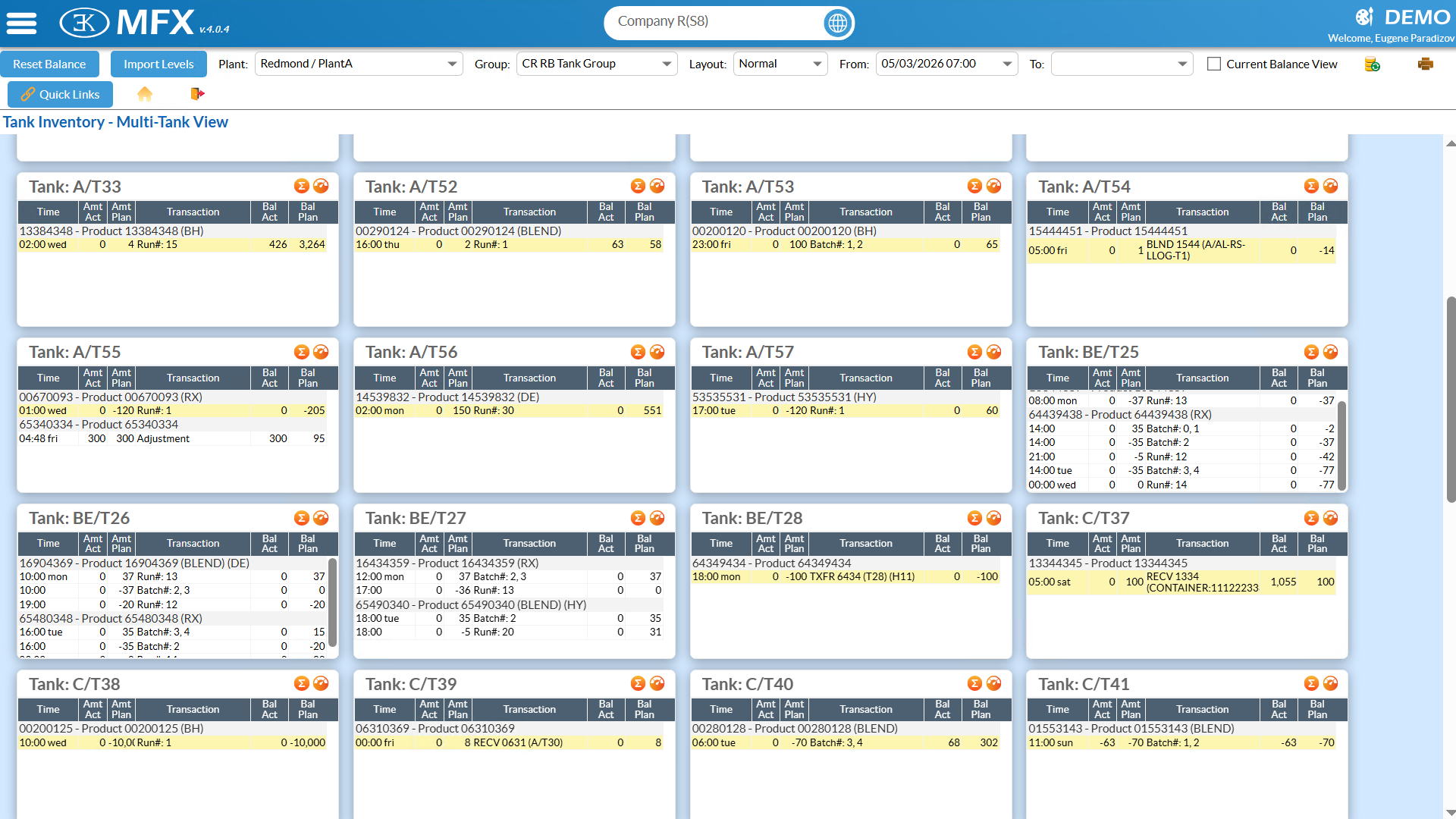
The multi-tank view shows actual and planned running balances side-by-side for every tank simultaneously — updated automatically as transfers, production, and shipments are entered.

Sensor Readings, One Click

Import the latest SCADA tank levels in one click. The system flags any tank whose sensor reading deviates too far from the running balance, and skips tanks with active overrides.

Dip Measurements, Fully Recorded

The Inventory Manager captures manual dip measurements per tank — operators enter inches, temperature, and lot data, and the system reconciles the physical actuals against the running balance.

Precise Balance Corrections

Post manual actual or planned adjustments to any tank at any point in time. Balances recalculate instantly and every adjustment is permanently logged with a full audit trail.

Inventory Management

Tank-based inventory visibility for raw, intermediate, and finished products with SCADA integration.

INV screenshot INV screenshot
INV · MES

What It Does

Tank Inventory maintains a running balance for every tank by reading movements from the Production Schedule, Blend Schedule, Shipping Schedule, and Loading Log automatically — no manual entry after operations. The Multi-Tank View shows every tank's actual and planned balance simultaneously, updated as work proceeds.

Automated Transfer Pipeline

Every scheduled movement — production completions, blend actuals, shipments, railcar receipts — writes to the TINV transaction ledger without planner intervention. The Multi-Tank View shows actual and planned running balances per tank simultaneously, updated continuously as operations proceed.

SCADA Import with Deviation Detection

The CIMPLICITY integration imports current sensor readings for all tanks in one click. Tanks with active sensor overrides are skipped automatically. Tanks where the sensor reading deviates significantly from the running ledger balance are flagged for investigation rather than silently accepted as corrections.

Physical Inventory Count

The Inventory Manager provides a structured walk-the-floor workflow: a count session scoped to a tank group loads an editable grid. The technician enters product, lot, dip measurement, temperature, and calculated volume. Completing the session locks the record and merges physical measurements into the TINV ledger as authoritative actuals.

Balance Adjustments

For movements outside the automated pipeline, the Balance Adjustment popup posts an actual or planned correction against a specific tank at a specific time. The nearby transactions panel shows surrounding ledger entries for context. Adjustments are permanent TINV records with author and timestamp — the running balance recalculates across all subsequent transactions.

See INV in Your Operation

Schedule a demo and we'll walk through Inventory Management alongside the full MES suite — and where it fits in the AI-Native platform we're building.

Back to MES